
SkyAICONSULTING

PERSONAL AI COACHING · MARIN COUNTY

Let’s see what
AI can do for you.

I’m Skyler, a former math teacher and AI engineer in Marin. Bring something you’d like to do with AI. We’ll work through it together, at your pace, so you understand the steps and can try them again on your own.

I’ll teach you:

  • Get comfortable. Choose a tool, write a useful prompt, and check its answers.
  • Work on something real. Improve a draft, understand a spreadsheet, or plan a project.
  • Go further when you’re ready. Explore scheduling, connected apps, and AI agents.

One person. One useful goal. 60 minutes on Google Meet.

Stinson Beach and the blue Pacific, seen from the hills above Marin
HERE IN MARINStinson Beach, Marin County

AI experience,
with a teacher’s perspective.

5 yearsteaching math

Voice AIbuilt for real conversations

Document AIexperience at EvenUp

START WITH SOMETHING OF YOURS

A small task.
A skill you can keep.

You don’t need a big project or the right vocabulary. We can start with something you already want to get done.

01 / WRITE & REVISE

A letter that sounds like you.

Bring a rough email, a letter, or a longer draft. Learn to give useful context, compare revisions, and keep your own voice.

02 / SORT & UNDERSTAND

A spreadsheet you can explain.

Work with a simple, non-sensitive list or spreadsheet. Ask better questions about it, organize the information, and check the result.

03 / PLAN & EXPLORE

An idea with a next step.

Plan a trip, explore a hobby, or outline a project. Turn a broad question into a useful plan and check the details against their sources.

HOW THE HOUR WORKS

You do the trying.
I help it make sense.

We’ll focus on one goal. You work in your own account, with room to ask questions and repeat the steps.

  1. BEFORE

    Bring a starting point.

    A question, a draft, or a task is enough. Have your laptop and any account you already use ready. We’ll agree on a manageable goal together.

  2. DURING

    Keep the keyboard.

    You try it; I explain what’s happening and why. We’ll adjust the prompt, check the answer, and have you repeat the key steps yourself.

  3. AFTER

    Know what to try next.

    We’ll finish by writing down the useful prompts, steps, and a next task to practice. You’ll have a short reference to keep beside you.

Skyler Santos smiling at an outdoor community event
Skyler Santos AI engineer. Former teacher. Marin local.
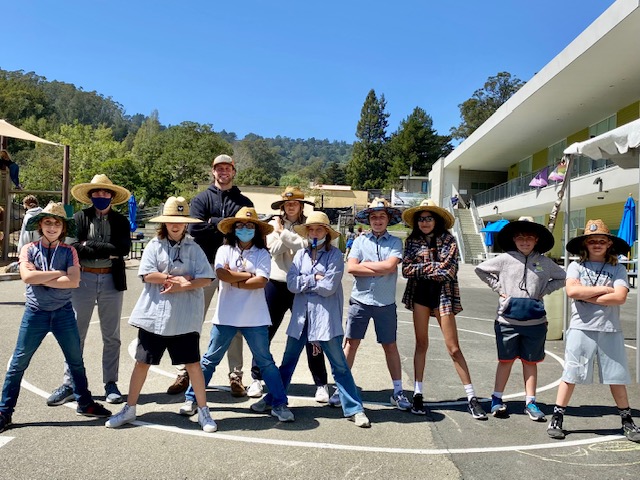
A group of students and adults wearing hats and posing together in a sunny school courtyard
Learning together.

HI, I’M SKYLER.

From teaching math
to building AI.

I spent five years teaching math before moving into AI. That experience matters here: a useful example and room to ask questions can make an unfamiliar idea much easier to understand.

I’ve since worked on voice AI at Caseflood and AI-generated documents at EvenUp. I’m an early adopter with professional experience across the major platforms, so we can get into how these systems work as well as how to use them.

What I want to do here is help people around Marin find their own use for this technology. We can start with one question and see where it leads.

THE TOOLS, WHEN YOU’RE READY

What would you
like to learn?

Your task comes first. We’ll choose a tool that fits, then go as deep as you want—from a first prompt to connected apps and advanced agents.

OpenAI logo
BY OPENAI

ChatGPT

Research, spreadsheet analysis, and reusable assistants. We can move from a better prompt to a workflow built around your own information.

RESEARCH & DATA ANALYSIS

WHAT WE CAN WORK ON

  • Deep ResearchCompare local service providers in a sourced brief, then check the evidence.
  • Data analysis & PythonClean a messy CSV, find patterns, and turn the results into charts.
  • Custom GPTsBuild a reusable assistant with instructions for your writing or recurring tasks.
Claude logo
BY ANTHROPIC

Claude

Detailed document work and coding with context. Start with a draft or prototype, then explore connected tools and specialized agents in Claude Code.

DOCUMENTS, CODE & AGENTS

WHAT WE CAN WORK ON

  • Long contextCompare lengthy proposals with your reference material in the same conversation.
  • ArtifactsTurn a rough idea into a working calculator or interactive prototype.
  • MCP & subagentsConnect Claude Code to your tools and delegate focused tasks to separate AI assistants.
Google Gemini logo
BY GOOGLE

Gemini

A useful fit when your work lives in Google’s tools. Bring together documents, visual information, and research with the apps you choose to connect.

MULTIMODAL & GOOGLE WORKSPACE

WHAT WE CAN WORK ON

  • GemsSave detailed instructions for a repeatable task, such as planning lessons or revising a newsletter.
  • Multimodal promptsWork through a diagram or photograph alongside written instructions.
  • Deep Research + WorkspaceBuild a project brief from web research and the Gmail or Drive material you select.
Grok logo
WEB & X SEARCH

Grok

Current web and X research, with a path into custom workflows through its API. Follow a topic and trace the claims back to their sources.

LIVE SEARCH & TOOL CALLING

WHAT WE CAN WORK ON

  • X SearchFollow reactions to a product launch and find the original posts.
  • Grounding & citationsAnchor an answer in current web sources and check what they actually support.
  • Tool calling through the APIBuild a workflow where Grok searches, summarizes, and calls your own software functions.

You don’t need to pick a platform first. Tell me what you have in mind.

YOUR OWN HOUR WITH SKYLER

Personal help.
A practical next step.

One-on-one coaching for individuals, built around your experience and your own task.

$125 60 minutes on Google Meet

  • One goal we choose together
  • Practice in your own account
  • Prompts, steps, and a next task to keep

Looking for team training or a business implementation? Let’s discuss that separately.

A FEW THINGS YOU MIGHT WONDER

Before we start.

What if I’ve never used AI?

That’s a perfectly good place to start. We can open a tool together, explain what you’re looking at, and work through a first question. You don’t need to prepare technical questions.

Do I need a paid AI account?

Bring any account you already use. We’ll choose an approach that fits what you have. If a task needs a paid feature, we’ll discuss it before you decide whether to upgrade.

Is this online or in person?

Sessions booked here are one-on-one video calls on Google Meet. Your confirmation includes the meeting link. I’m based in Marin; you can join from your own computer.

How do we handle private information?

You stay in control of your account and choose what to share. Keep passwords to yourself. We can use a made-up or redacted example instead of uploading sensitive documents, and review what’s appropriate before connecting an app.

What if I need to change my time?

Please give at least 24 hours’ notice to cancel or reschedule. Email skyler.p.santos@gmail.com if you need to change your booking.

Can we work on something more advanced?

Yes. We can explore scheduling and automation, MCP connectors that link AI to your tools, voice AI, or agent orchestration—how multiple AI assistants share work. We’ll choose a focused piece that fits the hour.

What is outside the session?

This is coaching in using and evaluating AI. Medical, legal, and financial decisions belong with a qualified professional. For a larger build or ongoing implementation, we’ll discuss the scope separately.

LET’S TALK

What have you
been curious about?

Send me a question, something you’ve tried, or an idea you haven’t quite figured out yet. We can talk through where to start.